

Number Transfer
If the shop previously had SMS login with another plugin such as Digits or Rafina, the customers' numbers are stored elsewhere. This tool links those numbers to their own accounts so a customer logs in with an SMS code to the same previous account, with their orders, addresses and wallet, not a new, empty account.
Where is it? Farin → Settings → Number Transfer
If your shop is new and had no customers before Farin, you do not need this tab. This tab works only for the site's main administrator.
Where numbers are read from
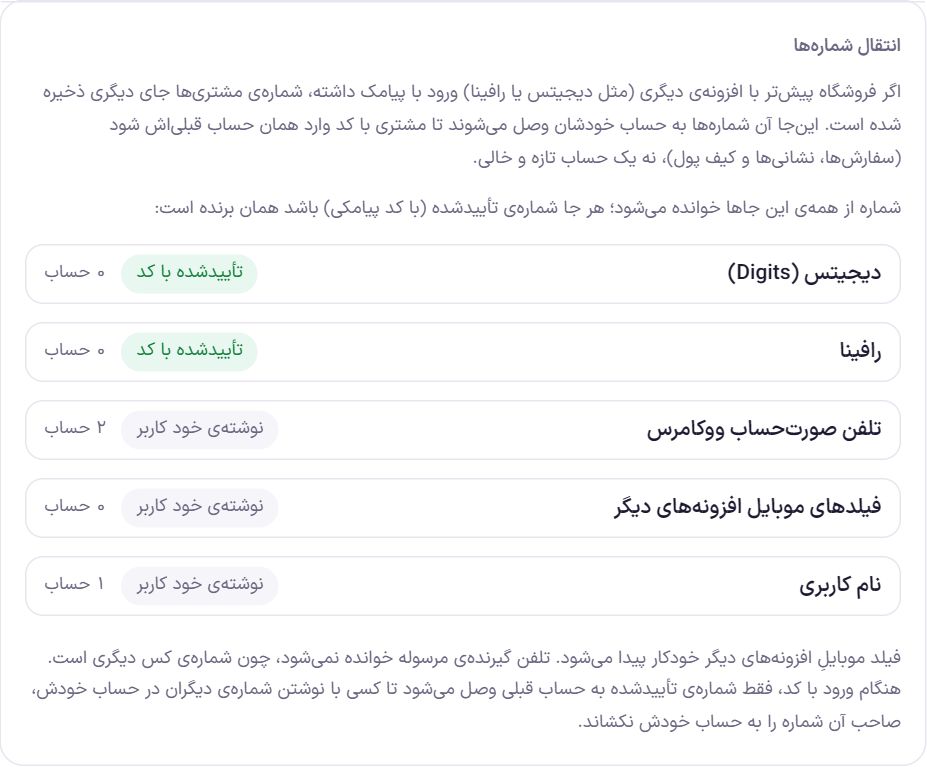
| Source | Label | What it means |
|---|---|---|
| Digits | Verified by code | A number the customer verified with an SMS code in Digits. |
| Rafina | Verified by code | A number the customer verified with an SMS code in Rafina. |
| WooCommerce billing phone | Written by the user | The phone the buyer wrote when ordering. |
| Mobile fields of other plugins | Written by the user | Mobile fields that other plugins have put on users' accounts. They are found automatically. |
| Username | Written by the user | When the username itself is a mobile number. |
If an account has a verified number, that one wins and the other sources are ignored. The “Written by the user” sources are read only when there is no verified number. The phone of a parcel's recipient is never read, because it is someone else's number.
Review and transfer
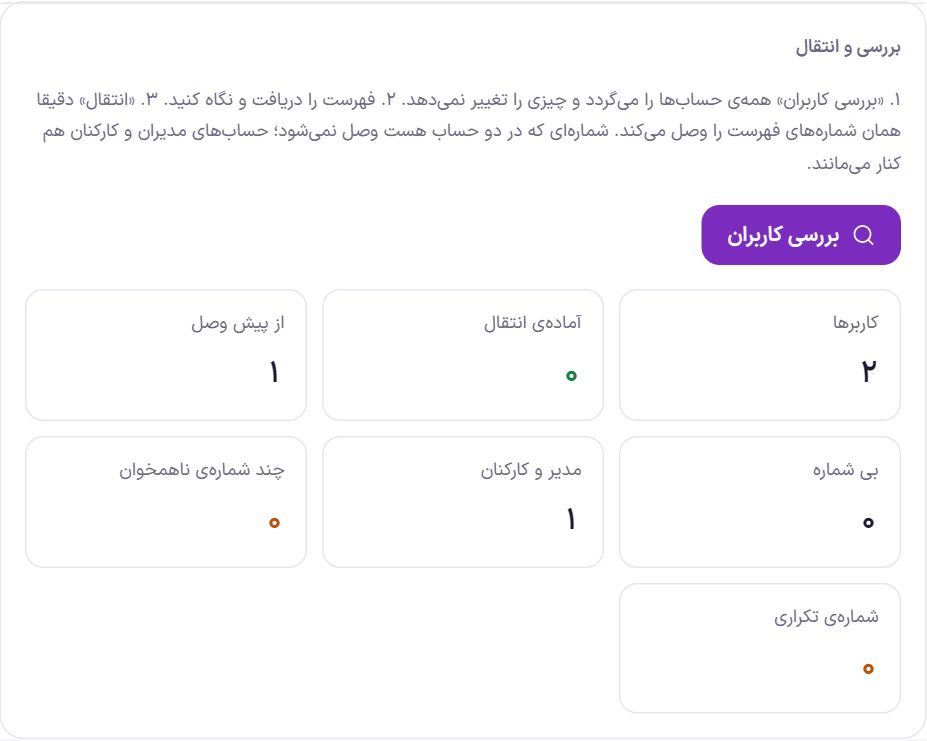
- Press “Check users”. All accounts are scanned in batches, and a progress bar shows how far it has got. This step changes nothing.
- Review the list. Click “Download list (CSV)” and open the file in Excel to see which number will be linked to which account.
- Click “Migrate”. The button shows the number of phone numbers. Exactly the numbers in the list are linked.
- Undo it if needed. “Undo last migration” removes every number linked in the last migration. Below the buttons you can see when the last migration happened and how many accounts it covered.
| Card | What it means |
|---|---|
| Users | All accounts on the site. |
| Ready to migrate | Accounts whose number will be linked when you click “Migrate”. |
| Already linked | Accounts whose number is already linked in Farin. |
| No number | They have no number in any source. |
| Admins and staff | Admin and staff accounts; they are always left out. |
| Conflicting numbers | Accounts that have different numbers in different sources, so it is unclear which is correct; they are not linked. |
| Duplicate number | Numbers that belong to more than one account; they are not linked. Their list, with the account IDs, appears below the cards. |
Frequently Asked Questions
Does running “Scan users” break anything?
No. The scan only reads and marks accounts; no number is linked to any account until you click “Migrate”.
Is the billing phone number trustworthy?
Not as much as a verified number; anyone can type any number when ordering. That is why you should review the CSV list before clicking “Migrate”. If you see a suspicious number, remove it from the user account and scan again.
Can I delete the old plugin after migrating?
Linked numbers are stored on the user account itself, separately from the old plugin, so you do not need it after migrating. Customers who have not been migrated yet still sign in using data that Digits or Rafina stored on the user account; before deleting the plugin, make sure removing it does not delete this data.
Farin Theme · 1405