

Unpaid orders
An order the customer places but doesn’t pay for keeps stock reserved. This section automatically cancels such orders after a deadline you set and returns the items to the warehouse.
Where is it? Rafina Panel → Unpaid orders
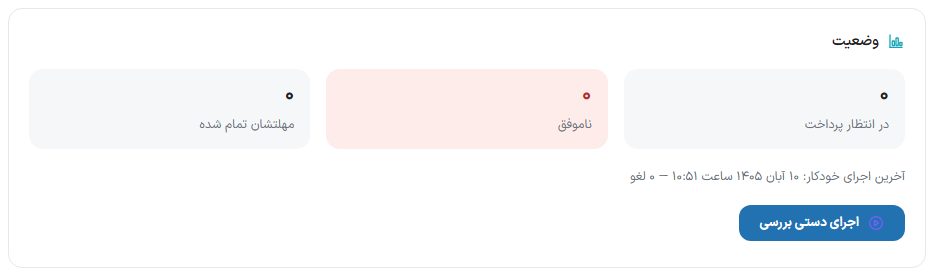
Status box
| Option | What it does |
|---|---|
| Awaiting payment | The number of orders not yet paid. |
| Failed | The number of orders whose payment failed. |
| Deadline passed | Orders that will be cancelled in the next check. |
| Last automatic run | The time of the last automatic check and the number of orders cancelled in it. The automatic check runs every 15 minutes. |
| Run check manually | Runs the check right now. It asks first, because orders past their deadline are cancelled and this can’t be undone. |
Payment deadline box
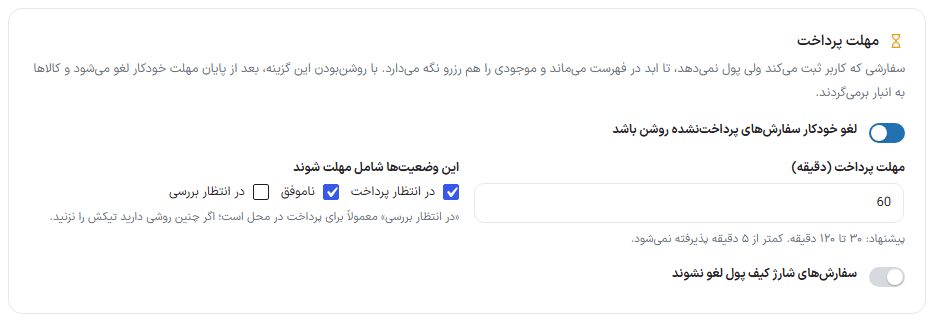
| Option | What it does | Default |
|---|---|---|
| Automatically cancel unpaid orders | The main switch; while it is off, no order is cancelled. | On |
| Payment deadline (minutes) | How many minutes after placement an unpaid order is cancelled. 30 to 120 minutes is suggested and less than 5 minutes is not accepted. | 60 |
| These statuses are subject to the deadline | Tick “Pending payment”, “Failed” and “Pending review”. “Pending review” is usually for cash on delivery; if you have such a method, don’t tick it. | Pending payment and failed |
| Don’t cancel wallet top-up orders | Orders the customer placed to increase their wallet balance are excluded from automatic cancellation. | Off |
Box for an order paid late
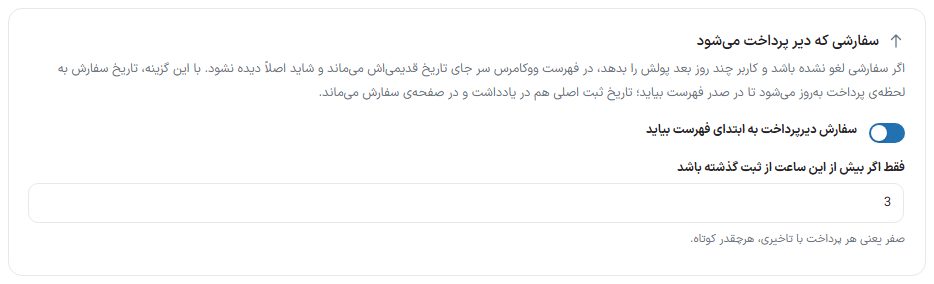
If an order hasn’t been cancelled and the customer pays a few days later, it stays in the WooCommerce list at its old date and may go unnoticed.
| Option | What it does | Default |
|---|---|---|
| Bring late-paid orders to the top of the list | The order date is updated to the moment of payment so it appears at the top of the list; the original placement date remains in the note and on the order page. | On |
| Only if more than this many hours have passed since placement | The “late” threshold. Zero means any payment with a delay, however short. | 3 hours |
After making changes, click “Save settings” below the boxes.
Orders whose deadline has just passed

This box shows orders that will be cancelled in the next automatic run (every 15 minutes) or with “Run manually”, with the columns “Order”, “Customer”, “Amount”, “Status” and “Placed on”. The “Refresh list” button re-reads it. If there are no orders, “There are no stuck orders.” is shown.
Frequently Asked Questions
What deadline should I set?
The deadline must be longer than the time a buyer usually stays on the bank page, otherwise the order is cancelled mid-payment. For most stores the default of 60 minutes is suitable.
Is this different from “Abandoned carts”?
Yes. An abandoned cart hasn’t become an order yet; this section deals with a placed order that hasn’t been paid. Abandoned carts guide